Performance Benchmarks
The fast-plscan library is a re-implementation of the fast-hdbscan library, while retaining most of the features from the classic hdbscan library. In this notebook, we compare the computational performance of these libraries. Since all three implementations use space trees, we are particularly interested in understanding how their performance changes as the number of dimensions increases.
[3]:
import time
import warnings
import numpy as np
import pandas as pd
import seaborn as sns
import matplotlib.pyplot as plt
from tqdm import tqdm
from sklearn.datasets import make_blobs

from hdbscan import HDBSCAN
from fast_hdbscan import HDBSCAN as FastHDBSCAN
from sklearn.cluster import KMeans
from fast_plscan import PLSCAN

plt.rcParams["figure.dpi"] = 150
plt.rcParams["figure.figsize"] = (2.75, 0.618 * 2.75)
warnings.simplefilter(action="ignore", category=FutureWarning)
[4]:
from importlib.metadata import version

for name in ["fast-plscan", "hdbscan", "fast-hdbscan", "scikit-learn"]:
    print(name, version(name))
fast-plscan 0.1.0.post3.dev13+g3c7f25aaa.d20260328
hdbscan 0.8.42
fast-hdbscan 0.3.1
scikit-learn 1.8.0
To make things easily repeatable we’ll write a simple benchmarking function that can time how long it takes the different implementations to run on the same randomly generated dataset. To generate the datasets we’ll just use make_blobs from sklearn. This will not produce the most interesting datasets for clustering, but it will be good enough to benchmark runtimes. Since we will be interested in varying the dimension of the dataset we’ll leave that as a parameter, and we’ll scale the size of
the blobs accordingly (there is more space in high dimensions so we can have a larger standard deviation on the blobs) to make it more realistic.
[5]:
def benchmark(
    data_sizes,
    dimensions,
    alg_classes,
    alg_params,
    alg_names,
    *,
    n_clusters=100,
    n_runs=5,
    min_samples=10,
    min_cluster_size=100,
    timeout=20,
):
    rows = []
    pbar = tqdm(total=n_runs * len(data_sizes) * len(dimensions) * len(alg_classes))
    for d in dimensions:
        max_size = {}
        for n_samples in data_sizes:
            min_cluster_size = min(n_samples // n_clusters, min_cluster_size)
            for n in range(n_runs):
                data_sample, _ = make_blobs(
                    n_samples=n_samples,
                    n_features=d,
                    centers=n_clusters,
                    cluster_std=min((10**d / (n_clusters * 9)), 2.0),
                )
                for Alg, param, name in zip(alg_classes, alg_params, alg_names):
                    # Skip algorithms that took too long on previous runs
                    if n_samples >= max_size.get(name, np.inf):
                        pbar.update()
                        continue

                    if name == "kmeans":
                        start_time = time.time()
                        with warnings.catch_warnings():
                            warnings.simplefilter("ignore")
                            Alg(n_clusters=n_clusters, **param).fit_predict(data_sample)
                        elapsed = time.time() - start_time
                    else:
                        start_time = time.time()
                        with warnings.catch_warnings():
                            warnings.simplefilter("ignore")
                            Alg(
                                min_samples=min_samples,
                                min_cluster_size=min_cluster_size,
                                **param,
                            ).fit_predict(data_sample)
                        elapsed = time.time() - start_time
                    if elapsed > timeout:
                        max_size[name] = n_samples
                    rows.append((name, n_samples, d, n, elapsed))
                    pbar.update()

    return pd.DataFrame(
        rows, columns=("algorithm", "n_samples", "n_features", "run", "elapsed_time")
    )
With that in hand we can run the benchmark. For reference this notebook was run on an 8-core machine. If you have fewer cores you’ll see less improvement, and if you have more cores, well, things will only look better.
[6]:
timeout = 20
dimensions = [2, 5, 10, 15, 20]
data_sizes = [5000, 10000, 20000, 40000, 80000, 160000, 320000, 640000, 1280000]
alg_classes = [PLSCAN, PLSCAN, FastHDBSCAN, HDBSCAN, KMeans]
alg_params = [{}, {"space_tree": "ball_tree"}, {}, {}, {}]
alg_names = [
    "plscan (kd-tree)",
    "plscan (ball-tree)",
    "fast_hdbscan",
    "hdbscan",
    "kmeans",
]
[7]:
benchmark_results = benchmark(
    data_sizes, dimensions, alg_classes, alg_params, alg_names, timeout=timeout
)
benchmark_results.to_parquet("data/generated/benchmark_time.parquet", index=False)
100%|██████████| 1125/1125 [40:00<00:00, 2.13s/it]
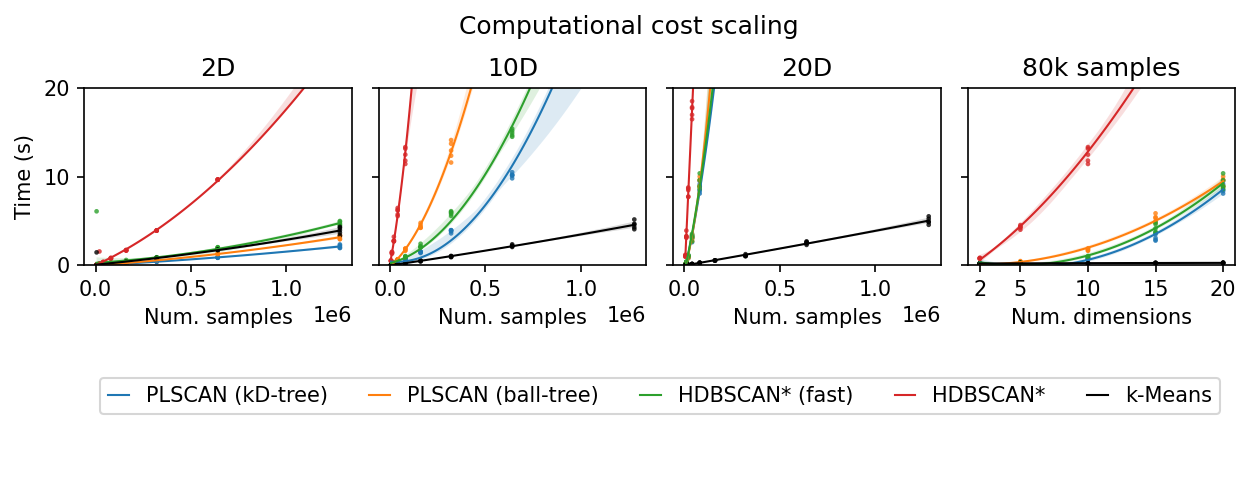
Plotting the results, we observe considerable differences between hdbscan and the fast-hdbscan and fast-plscan libraries on low-dimensional data. The parallel implementations offer substantial improvements in scalability.
[8]:
benchmark_results = pd.read_parquet("data/generated/benchmark_time.parquet")
[9]:
def to_display_name(input):
    if input == "kmeans":
        return "k-Means"
    if input == "hdbscan":
        return "HDBSCAN*"
    if input == "fast_hdbscan":
        return "HDBSCAN* (fast)"
    if input == "plscan (kd-tree)":
        return "PLSCAN (kD-tree)"
    if input == "plscan (ball-tree)":
        return "PLSCAN (ball-tree)"
    return input
At 10 dimensions, the advantage of parallelization remains, but the scaling curves become steeper than that of kmeans, which is largely unaffected by the number of dimensions. Interestingly, the ball-tree implementation in fast-plscan scales considerably worse than the kd-tree implementation.
At 20 dimensions, the parallel implementations provide little benefit when compared to kmeans, which continues to perform efficiently regardless of dimensionality.
Plotting over the dimensions we see only kmeans does not need more time with higher dimensional data. The scaling trends are a bit more complicated. hdbscan starts of steepest but appears to level off a bit. Ball-tree fast-plscan quickly approaches the hdbscan curve with higher dimensions. The curves for fast_hdbscan and kd-tree fast-plscan remain fairly shallow, with fast-plscan consistently being slightly quicker. kmeans is unaffected by the number of
dimensions, achieving quick times in all cases.
[10]:
legend_ids = [[], [], [0, 1, 2], [3, 4]]
palette = ["C0", "C1", "C2", "C3", "k"]
ticks = [0, 10, 20]

plt.figure(figsize=(2.75 * 3, 3.25))
for i, d in enumerate([2, 10, 20]):
    plt.subplot(2, 4, i + 1)
    plt.title(f"{d}D")
    for j, name in enumerate(alg_names):
        sns.regplot(
            benchmark_results.query(f"n_features == {d} & algorithm == '{name}'"),
            x="n_samples",
            y="elapsed_time",
            color=palette[j],
            order=2,
            line_kws={"linewidth": 1},
            scatter_kws={"s": 5, "edgecolor": "none"},
        )
    plt.xlabel("Num. samples")
    plt.ylim(0, timeout)
    plt.yticks(ticks)
    if i == 0:
        plt.ylabel("Time (s)")
    else:
        plt.ylabel("")
        plt.gca().set_yticklabels(["" for t in ticks])
plt.subplot(2, 4, 4)
for i, name in enumerate(alg_names):
    with warnings.catch_warnings():
        warnings.simplefilter("ignore")
        sns.regplot(
            benchmark_results.query(f"algorithm == '{name}' & n_samples == 80000"),
            x="n_features",
            y="elapsed_time",
            color=palette[i],
            order=2,
            line_kws={"linewidth": 1},
            scatter_kws={"s": 5, "edgecolor": "none"},
        )

plt.xticks([2, 5, 10, 15, 20])
plt.ylim(0, timeout)
plt.yticks(ticks)
plt.gca().set_yticklabels(["" for t in ticks])
plt.ylabel("")
plt.xlabel("Num. dimensions")
plt.title("80k samples")
plt.suptitle("Computational cost scaling", y=1)

plt.subplot(2, 1, 2)
plt.legend(
    handles=[
        plt.Line2D([0], [0], color=p, lw=1, label=to_display_name(n))
        for p, n in zip(palette, alg_names)
    ],
    loc="lower center",
    bbox_to_anchor=(0.5, 0.3),
    handlelength=1,
    ncol=5,
)
plt.axis("off")

plt.subplots_adjust(0.06, 0.05, 0.99, 0.85, wspace=0.1)
plt.show()